Quick guide
How it works with Taac!
From finding the charger to the receipt, without surprises on the price.
Decide how much to spend
Up to an amount, or a full charge
Before you start you choose an amount — €5, €10, €20, €30 or €50 — or a full charge. The app tells you how many kWh that is and how long it takes, and stops the charge when you reach the limit: you pay only what you use, and the rest of the hold is released on its own. On your card we hold the amount you chose plus €5 (€60 for a full charge), and we tell you before you confirm. If the charger reports its readings late we stop a little earlier, never later.
A clear price, in three lines
On other operators' chargers the price has three parts, all VAT included and with up to four decimals: the energy per kWh, the session fee (which includes the payment commission) and, where it applies, the idle fee per minute — from the start, after a given number of minutes or at the end of the charge. You find the same three lines on the receipt and on the invoice.
One place, every socket
If the same car park has chargers from different operators, you see them in a single card, operator by operator, with the prices side by side. And when you open the app already standing at a charger, the app opens it for you.
Pay the way you like
Cards issued in the European Economic Area, with Apple Pay and Google Pay too (on the web app now, in the store apps soon). No subscription.
You find the charger
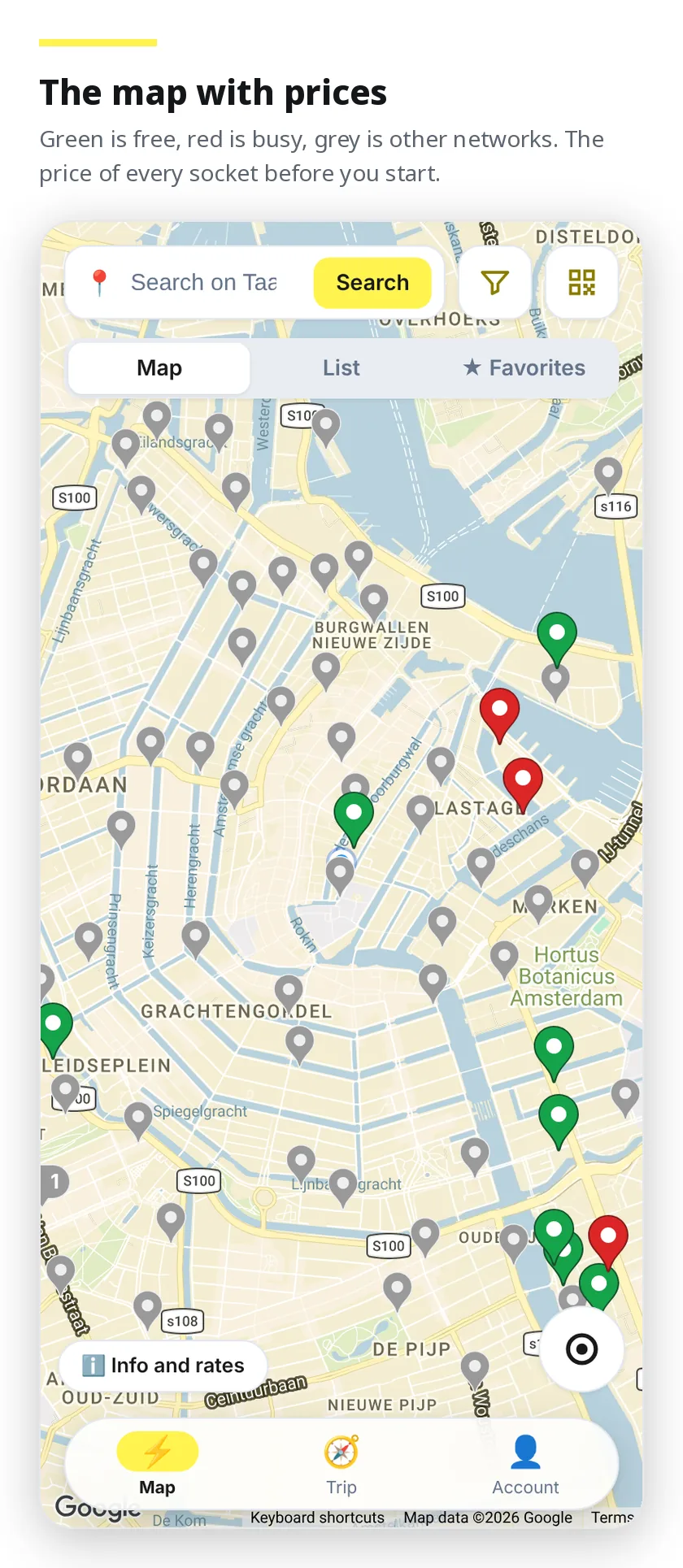
Map and list, with the price already written on each socket. You filter by connector type, power and operator, and you search by address: every charger tells you how many metres away it is from the point you looked up.
Busy chargers you recognise by their colour, and you can ask to be told the moment one frees up. The ones you use often go into your favourites, under whatever name you like — it saves the place, not the single socket.
On the map you also see points of other networks the app does not sell (in grey, from OpenChargeMap) and Tesla Superchargers and Destination chargers, with the number of stalls and whether they are Tesla only or open to every car. You see them and you can navigate to them; you do not pay for them with Taac!
You know what you spend before you plug in
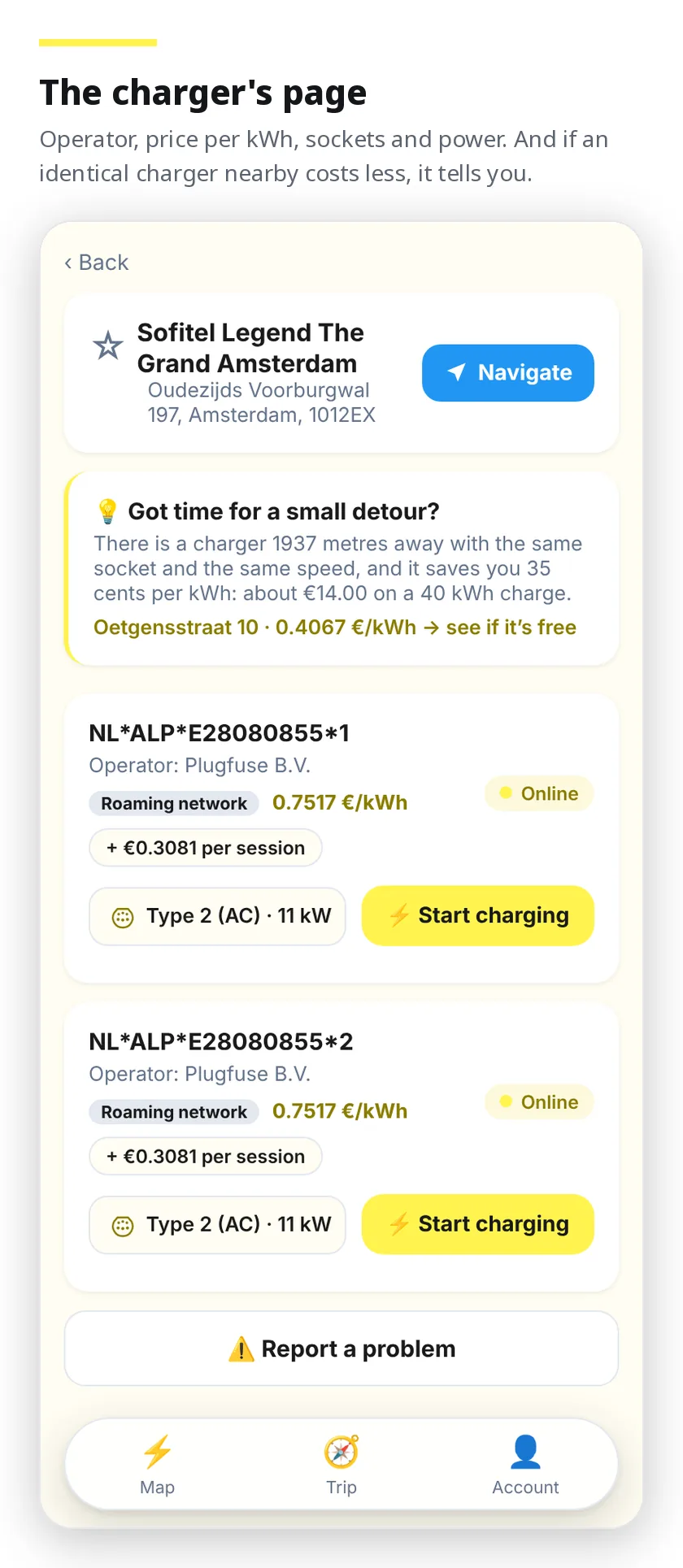
The price is on every socket's page, VAT included, before you start anything. With your car in the Garage the app also estimates what it costs to take the battery up by half, in euros and in minutes, choosing between alternating and direct current where the charger has both.
It never promises more power than your car actually accepts: a Tesla on alternating current stops at 11 kW, and the estimate says so. The battery capacity the app already knows, for 170 models — there is nothing to type in.
And if there is an identical charger a couple of steps away that costs less, we tell you. Even when the more expensive one is ours.
You charge across half of Europe with the same account
Beyond the Taac! network there are the chargers of other operators in twenty-five countries, Ionity included. Same app, same payment, same receipt: no subscription and no activation fee.
Today that means more than 23,000 stations and more than 95,000 sockets. The price list, operator by operator and country by country, is public and on this site — not only inside the app.
You book the socket
On a charger that takes bookings you hold the socket for fifteen minutes, free of charge, the time it takes you to get there.
You pay the way you want
With a saved card
One tap and the charge starts. Receipt for private customers, invoice for anyone with a VAT number: it all stays in your history.
As a guest
No account at all: you pick the socket, you pay by card and you go. Your email is optional and only serves to send you the receipt.
After paying you have two minutes to plug the cable in, with the countdown in plain sight. If you do not plug in, the pre-authorisation cancels itself and nothing is left on the card.
You pay exactly the kWh you received, at the price you read in the app, to the cent: the receipt and the invoice carry those same two numbers. No price recalculated afterwards.
On other operators' chargers you follow the session in the same screen as a Taac! one: status, energy, duration — and, for a Tesla, the car's own controls.
It tells you what is happening
Charge started, finished, interrupted. A socket you were following that frees up. A booking about to expire. On the phone and in the browser, without keeping the screen on.
Start from your phone and follow the charge from your computer, a tablet or CarPlay: every device signed in to the same account shows the same session at the same moment — the countdown to plug in, the charge in progress, the reminder to unplug and the final summary, on the Taac! network and in roaming alike.
On the stores, or straight from your browser
Taac! is on the App Store and Google Play. If you would rather not install anything, the same app runs in your browser: add it to your home screen and it opens full screen, notifications included.